
A useful garage job card follows one repair from booking to handover. It records what the customer reported, what you found, what they authorised and what you actually completed. It is an internal work record; the quote explains proposed work and price, while the invoice records the amount billed.
Free job card template
Use the headings below on paper or in your existing system. The downloadable text file can be edited in a document editor and printed. No account or email address is needed.
Download the editable job card
Job card · blank worksheet
- Job reference and appointment
- Reference · date · arrival time · technician · agreed contact method
- Customer and vehicle
- Customer contact · registration · make/model · mileage · relevant vehicle details
- Reported concern
- Customer's words · when it happens · requested work · initial limits
- Findings and proposed work
- Checks performed · findings · supporting photos/readings · proposed labour and parts
- Customer decision
- Quote reference/version · approved scope and price · who approved · date/time · method · declined or deferred work
- Work completed
- Actual labour · parts fitted · checks after repair · unresolved concerns
- Handover and paperwork
- Customer update · advice given · quote/invoice reference · payment record reference
What should a garage job card include?
Keep the complaint separate from the diagnosis. “Rattle on cold start” is an observation; naming a failed component is a conclusion that needs supporting checks. Keeping both makes the repair history more useful when a vehicle returns.
- Use one job reference across notes, photos, parts requests, quotes and the final invoice.
- Record enough vehicle detail to identify the correct job and parts. Verify specification rather than relying only on a familiar model name.
- Write down the agreed investigation or repair scope, including any diagnostic charge or spending limit you have agreed.
- Record what was tested and found, rather than writing only “checked” or “fixed”.
- Record declined work separately from completed work so a recommendation cannot be mistaken for a repair.
Worked example: a booking that needs additional work
Example job card · HH-1042
Vehicle: Ford Focus. Reported concern: customer requests a service and reports a vibration when braking.
Initial agreement: carry out the quoted service and investigate the reported vibration within the agreed diagnostic scope.
Finding: technician records inspection results and measurements separately. Additional repair work is proposed in quote Q-1042, version 2.
Decision: record the customer's decision on that exact quote, including the approved scope, total, time and contact method. Keep any deferred recommendation visible.
Completion: record the work actually performed, parts fitted, relevant post-repair checks and handover notes. Link the final invoice to the approved work.
The example deliberately does not prescribe a repair from a symptom. The job card should show the evidence behind the proposed repair.
Keep approvals and handover attached to the job
For a more detailed example and suggested wording, read the customer approval guide for extra garage repairs.
If a booking changes, update the quote and record the new decision before carrying out the additional work. A general note saying “customer happy” does not explain which work or price was agreed. A written summary also helps the next member of the team understand the decision.
At handover, distinguish work completed, checks performed and further recommendations. Record invoice and payment references without storing card details in a job card. Use your existing privacy and record-retention process for customer information.
Paper versus digital job cards: what actually changes?
The useful comparison is whether another person can pick up the correct job and understand the next action. A paper sheet, a PDF and a connected job record can all contain good notes. None of them makes an incomplete brief or an unrecorded customer decision reliable.
Paper: make the latest version easy to find
A printed card gives the technician a simple place to write while working. Decide where the current sheet lives, who updates it and where completed cards are stored. If photos or a revised quote live elsewhere, write their references on the card. A second printout needs a clear version or replacement rule so two people do not work from different instructions.
Files and spreadsheets: keep the references connected
An editable document or spreadsheet can suit a workshop that wants a familiar starting point. Test how you identify the current copy, attach evidence and find the matching quote and invoice. A scanned sheet preserves an image of the page; it does not automatically turn handwritten findings into searchable fields or keep a separate job-status list up to date.
Connected digital records: test the whole handover
A shared system can put the job, customer and related paperwork together, but check the actual workflow on the devices your team uses. Who can edit the record? Where does a revised quote appear? What happens if the connection drops? Do not assume every desktop feature works on a phone, or that a cloud product works offline.
For each option, check access for the right people, recovery from a lost sheet or device, and how you retrieve completed work. Ask what each export actually includes: an invoice CSV is not necessarily a complete copy of job notes, photos and decisions. Keep using your existing privacy, security and retention process whichever format you choose.
Business Companion's motor repair guidance, for England, Scotland and Wales, explains agreeing unexpected extra costs before doing the work and providing a clear record of completed work. The choice of paper or software does not replace that conversation. Keep the actual decision tied to the scope and price agreed.
Try one practice job before changing your process
Illustrative handover · job HH-2046
In this example, a customer books a service and reports a noise. After the agreed checks, the technician proposes extra work in a revised quote. The customer approves only part of it; one required part is still outstanding. A different team member picks up the job the next morning.
Using sample details, try that same sequence with your paper card and the digital option you are considering. It is a comparison exercise, not a real diagnosis, approval or payment.
- Find the brief. Can the next person distinguish the reported concern, agreed initial work and checks already performed?
- Find the exact decision. Can they identify the revised quote, approved price and scope, and the work deferred? A draft or copied link is not evidence that a customer received or approved it.
- Find the blocker. Is the outstanding part clear, with an owner and next action? Do not confuse work waiting for a part with work completed.
- Finish the record. Record only work actually done, then check the handover notes and matching invoice. A payment link or sent invoice does not prove payment arrived.
- Retrieve it later. Close the record and find it again using the job or vehicle reference. Note any information that still requires a separate message, folder or notebook.
Download the handover comparison check
Write down the missing step rather than an assumed saving in minutes. If paper is working, keep it until you have a clear reason and a tested replacement. If you move, choose a cutover date for new jobs, label older records clearly and assign one place for updates on each live job. Avoid maintaining two competing status records indefinitely.
When does a digital job card help?
Paper can work for a small workload. The friction comes when notes, photographs, approvals and invoices live in different places or when more than one person needs the latest status.
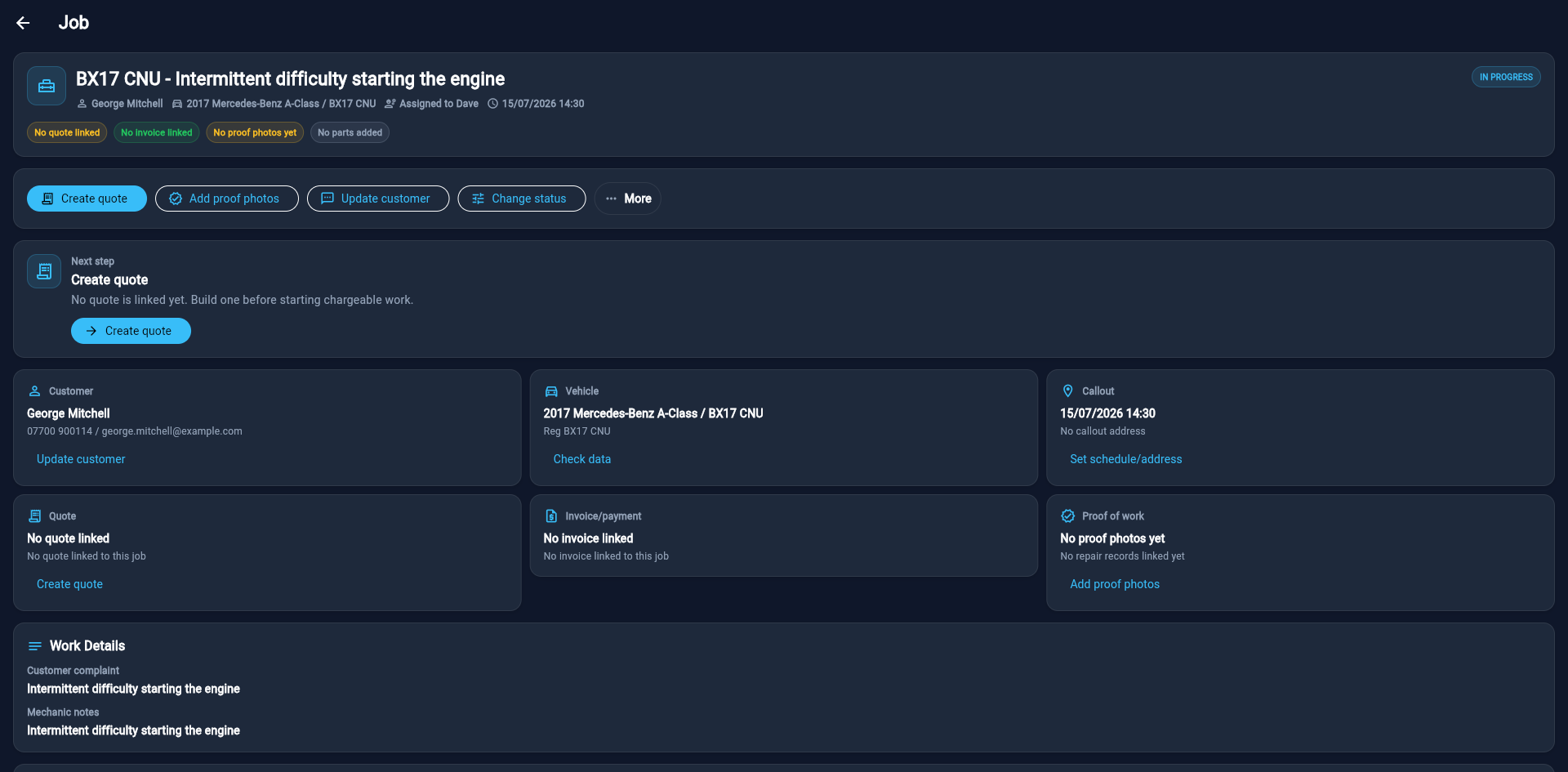
HoodHero's job and vehicle records keep that context connected. Its proof-of-work tools support repair evidence, and quotes and invoices keep the paperwork alongside the work.
For callouts, see the mobile mechanic admin workflow. For a wider software comparison checklist, read our garage management checklist.
Put it into practice
See the workflow in Mechanic Desk.
Explore bookings, job records and quotes in HoodHero to see how it fits your workshop.
7 days free · £0 today. Then £12.99/month or £120/year at introductory prices. Add payment details only if you want to continue.